Instructions
- Use existing documents: 使用现有的操作程序、支持脚本或政策文档来创建 LLM 友好的 routines.
- Prompt agents to break down tasks: 提供更小、更清晰的步骤有助于最大限度地减少歧义, 并帮助模型更好地遵循指令.
- Define clear actions: 确保 routine 中的每一步都对应一个特定的行动或输出.
- Capture edge cases: 实际交互通常会产生决策点, 一个健壮的 routine 会预测常见的变化, 并包含关于如何通过条件步骤或分支来处理它们的指令, e.g. 在缺少所需信息时提供替代步骤.
您是 LLM 智能体指令编写专家.
请将以下帮助中心文档转换为一组清晰的指令, 以编号列表形式编写.
该文档将成为 LLM 遵循的政策. 确保没有歧义, 并且指令是以智能体的指示形式编写的.
要转换的帮助中心文档如下 {{help_center_doc}}
How to write a great AGENTS.md lessons from over 2500 repositories:
- States a clear role: Defines who the agent is (expert technical writer), what skills it has (Markdown, TypeScript), and what it does (read code, write docs).
- Executable commands: Gives AI tools it can run. Commands come first.
- Project knowledge: Specifies tech stack with versions (React 18, TypeScript, Vite, Tailwind CSS) and exact file locations.
- Real examples: Shows what good output looks like with actual code. No abstract descriptions.
- Three-tier boundaries: Set clear rules using always do, ask first, never do. Prevents destructive mistakes.
Role -> Tool -> Context -> Example -> Boundary
Vibe Coding
- Spec the work:
- 目标: picking next highest-leverage goal
- 分解: breaking the work into small and verifiable slice (pull request)
- 标准: writing acceptance criteria, e.g. inputs, outputs, edge cases, UX constraints
- 风险: calling out risks up front, e.g. performance hot-spots, security boundaries, migration concerns
- Give agents context:
- 仓库: Repository conventions
- 组件: Component system, design tokens and patterns
- 约束: Defining constraints: what not to touch, what must stay backward compatible
- Direct agents
what, nothow:- 工具: Assigning right tools
- 文件: Pointing relevant files and components
- 约束: Stating explicit guardrails, e.g.
don't change API shape,keep this behavior,no new deps
- Verification and code review:
- 正确性 (correctness): edge cases, race conditions, error handling
- 性能 (performance):
N+1queries, unnecessary re-renders, over-fetching - 安全性 (security): auth boundaries, injection, secrets, SSRF
- 测试 (tests): coverage for changed behaviors
- Integrate and ship:
- Break big work into tasks agents can complete reliably
- Merge conflicts
- Verify CI
- Stage roll-outs
- Monitor regressions
Spec → Onboard → Direct → Verify → Integrate
System
- Instructions.
- Git instructions.
AGENTS.mdspec.- Citations instructions.
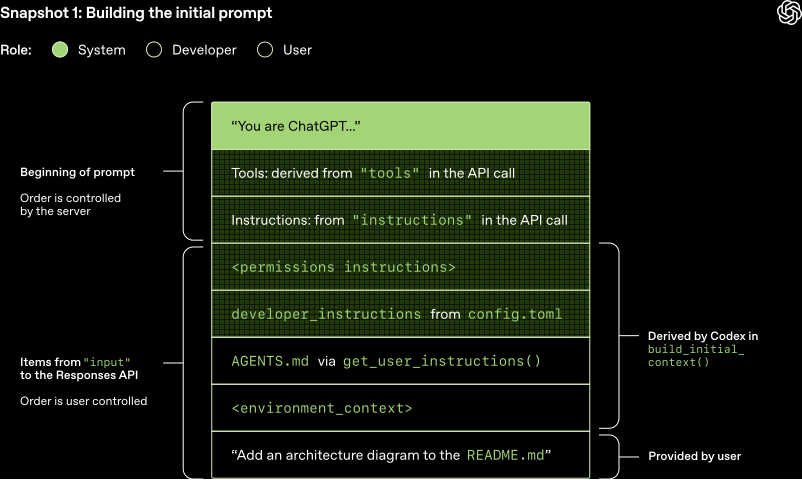
Coding
AGENTS.md
AGENTS.mdshould define your project's WHY, WHAT, and HOW.- Less is more. Include as few instructions as reasonably possible in the file.
- Keep the contents of your
AGENTS.mdconcise and universally applicable. - Use Progressive Disclosure. Don't tell Agent all the information to know, tell Agent when to needs, how to find and use it.
- Agent is not a linter. Use linters and code formatters, and use other features like Hooks and Slash Commands.
AGENTS.mdis the highest leverage point of the harness, so avoid autogenerating it. You should carefully craft its contents for best results.
Minimalism
Ponytail makes agent think like the laziest senior dev: write only what the task needs. Before writing code, descend the minimalism ladder and stop at the first rung that holds:
- 这段代码需要存在吗? → 否: 跳过 (
YAGNI) - 代码库里已经有了? → 复用, 不要重写
- 标准库能做? → 用标准库
- 平台原生功能? → 用原生 (
<input type="date">胜过装一个flatpickr组件) - 已安装的依赖能做? → 用它
- 一行能搞定? → 一行
- 都不行: 才写
能工作的最小实现
对解决方案偷懒, 对读代码从不偷懒: 先读懂改动涉及的代码和真实流程, 再选择阶梯档位. 验证、错误处理、安全和可访问性永远不在砍掉的范围. "少写代码"绝不削减信任边界校验和数据丢失处理.
Design
DESIGN.md
is a plain-text design system that design agents read to generate consistent UI:
Markdown needs no parsing, so no Figma exports or JSON schemas.
| File | Who reads it | What it defines |
|---|---|---|
AGENTS.md | Coding agents | How to build the project |
DESIGN.md | Design agents | How the project should look and feel |
Shared Language
Ubiquitous language from Domain-Driven Design, adapted for coding agents:
- Create a
CONTEXT.mdthat maps project jargon to concise domain terms. - Agents decode jargon from the shared language instead of guessing, producing shorter, more accurate output and spending fewer tokens.
- Variables, functions, and files are named consistently using the shared vocabulary, making the codebase easier to navigate for both humans and agents.
BEFORE: "There's a problem when a lesson inside a section
         of a course is made 'real' (i.e. given a spot in the file system)"
AFTER:  "There's a problem with the materialization cascade"
Grilling sessions (/grill-me, /grill-with-docs) close the communication gap before coding starts:
the agent relentlessly interviews you until every branch of the decision tree is resolved.
Pull Request
GitHub copilot to debug issues faster:
You are an experienced engineer working on this codebase.
Always ground your answers in the linked docs and sources in this space.
Before writing code, produce a 3–5 step plan that includes:

- The goal
- The approach
- The execution steps

Cite the exact files that justify your recommendations.
After I approve a plan, use the Copilot coding agent to propose a PR.
Testing
Create a test agent for this repository. It should:

- Have the persona of a QA software engineer.
- Write tests for this codebase
- Run tests and analyzes results
- Write to “/tests/” directory only
- Never modify source code or remove failing tests
- Include specific examples of good test structure
Research
AI agents powered by tricky LLMs prompting:
- Deep research agent from claude agents cookbook.
- DeepCode: Agentic coding.
- Generative agent.
- Minecraft agent.
References
- Claude system prompts. Claude code system prompts.
- Agent system prompts.