Background

CSS Background

Background Color

background-color:

  • <color>: initial value transparent.
  • background shorthand property: background-color value only be included in last layer specified.

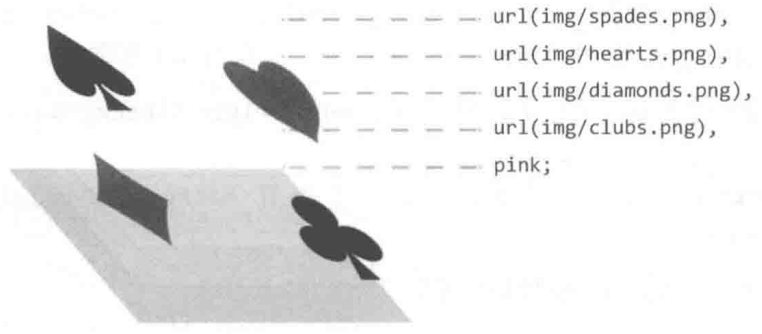
Background Image

background-image:

  • url().
  • image-set([<image> <resolution>]#).
  • linear-gradient().
  • radial-gradient().
  • conic-gradient().
  • 语法越靠后的背景图像的层叠等级越低: background 一般设置为 background-image# background-color.

Multiple Background Image

.image-set {
width: 128px;
height: 96px;
background: url('fallback.jpg');
background: image-set(url('w128px.jpg') 1x, url('w256px.jpg') 2x, url('w512px.jpg') 3x);
background-size: cover;
}

Background Repeat

.background-repeat {
/* Keyword values */
background-repeat: repeat-x;
background-repeat: repeat-y;
background-repeat: repeat;
background-repeat: space;
background-repeat: round;
background-repeat: no-repeat;

/* Two-value syntax: horizontal | vertical */
background-repeat: repeat space;
background-repeat: repeat repeat;
background-repeat: round space;
background-repeat: no-repeat round;
}

Background Position

Percentage background position (<position> type):

  • X offset value = (container width - image width) * (position x%).
  • Y offset value = (container height - image height) * (position y%).
/* Keyword values */
background-position: top;
background-position: bottom;
background-position: left;
background-position: right;
background-position: center;

/* <percentage> values */
background-position: 25% 75%;

/* <length> values */
background-position: 0 0;
background-position: 1cm 2cm;
background-position: 10ch 8em;

/* Multiple images */
background-position:
0 0,
center;

/* Edge offsets values */
background-position: bottom 10px right 20px;
background-position: right 3em bottom 10px;
background-position: bottom 10px right;
background-position: top right 10px;

Background Position

Background Clip

指定背景显示范围:

  • border-box.
  • padding-box: 虽然 border 层叠等级高于 background, 但是透明边框在视觉上仍会被有色背景覆盖 (背景会延伸至边框下方). 设置 background-clip: padding-box 可用于保证 border-color: transparent 不被 background-color: white 视觉覆盖.
  • content-box.
  • text: 可用于实现渐变文字/镂空文字/背景蒙版文字.
@property --offset {
syntax: '<length>';
inherits: false;
initial-value: 5px;
}

@keyframes move {
to {
--offset: 15px;
}
}

p {
color: #000;
}

/* 同心圆外扩动画 */
p:hover {
color: transparent;
background: repeating-radial-gradient(
circle at 0 0,
#000 calc(var(--offset) - 5px),
#000 var(--offset),
#fff var(--offset),
#fff calc(var(--offset) + 5px)
);
background-clip: text; /* -webkit-background-clip: text; */
animation: move 0.5s infinite linear;
}

可以利用多重背景实现 border-image:

background: linear-gradient(white, white) padding-box, var(--repeating-stripe-gradient), 语法靠前的 padding-box 白色背景处于高层, 遮住大部分条纹背景, 导致条纹背景只显示在 border 区域, 从而模拟实现 border-image 效果.

.stripe-border {
padding: 1em;
background:
linear-gradient(white, white) padding-box,
repeating-linear-gradient(
-45deg,
red 0,
red 12.5%,
transparent 0,
transparent 25%,
#58a 0,
#58a 37.5%,
transparent 0,
transparent 50%
)
0 / 5em 5em;
border: 1em solid transparent;
}

Background Origin

指定背景绘制起点:

  • padding-box.
  • border-box.
  • content-box.
  • 影响 background-size: <percentage> 大小.
  • 影响 background-position 定位.
  • 影响起点两侧背景样式细节.

Background Size

background-size:

  • auto{1,2}:
    • 具有 intrinsic size 的背景 (e.g. 位图), computed to [intrinsic size, intrinsic size].
    • 具有一个方向 intrinsic size, 具有 intrinsic ratio 的背景 (e.g. 矢量图), computed to [intrinsic size, intrinsic size * intrinsic ratio].
    • 具有一个方向 intrinsic size, 不具有 intrinsic ratio 的背景 (e.g. 矢量图), computed to [intrinsic size, extrinsic size].
    • 不具有 intrinsic size, 具有 intrinsic ratio 的背景 (e.g. 矢量图), computed to contain (等比例缩放).
    • 不具有 intrinsic size, 不具有 intrinsic ratio 的背景 (e.g. CSS gradient), computed to [extrinsic size, extrinsic size].
  • cover: 等比例裁剪, 部分图像会裁剪.
  • contain: 等比例缩放, 部分区域会留白.
  • <length-percentage>{1,2}:
    • <percentage>: calculate by extrinsic size and background-origin box.
.background-size {
background-size: cover;
background-size: contain;
background-size: 100%;
background-size: 20px;
background-size: auto 100%;
background-size: auto 20px;
background-size: 100% 100%;
background-size: 20px 20px;
}

.video {
min-width: 100%;
min-height: 100%;
overflow: hidden;
background-size: cover;
}

Background Attachment

background-attachment:

  • scroll: scrolls with main view, but stays fixed inside local view.
  • local: scrolls both with main view and local view.
  • fixed: stays fixed no matter what.

Background Scroll View

对于可以滚动的元素 (overflow: scroll):

  • background-attachment: scroll 时, 背景图不会随元素内容的滚动而滚动 (fixed inside local view).
  • background-attachment: local 时, 背景图会随元素内容的滚动而滚动 (scroll with local view).

滚动阴影:

/**
* 纯白渐变背景随列表滚动而滚动, 灰度渐变背景不随列表滚动而滚动.
* 列表滚动时, 纯白渐变背景移出视口, 露出灰度渐变背景.
*/
.scrollable-list {
background: linear-gradient(#fff 30%, transparent), radial-gradient(at 50% 0, rgb(0 0 0 / 20%), transparent 70%);
background-repeat: no-repeat;
background-attachment: local, scroll;
background-size:
100% 50px,
100% 15px;
}

Background Parallax Effect

Implement scroll parallax effect background-attachment: fixed:

/* parallax effect */
body {
box-sizing: border-box;
width: 100%;
height: 100vh;
padding: 0;
margin: 0;
}

.parallax {
min-height: 60%; /* key */
background-image: url('./images/bg.jpg');
background-repeat: no-repeat;
background-attachment: fixed; /* key */
background-position: center;
background-size: cover;
}

CSS Shadow

Text Shadow

`text-shadow:

  • none.
  • <shadow-text>#: <length>{2,3} && <color>?.
    • 支持多重阴影.
    • 不支持内阴影.
    • <length>{2,3}: 不支持扩展阴影 offset-x offset-y blur-radius.
    • <color>?: default revert (user agent color).
:root {
--colo: #c0c0c0;
--br-shadow: -6px 6px 15px rgb(0 0 0 / 50%);
--tl-shadow: 6px -6px 15px rgb(255 255 255/80%);
}

body {
background: var(--color);
}

/* 新拟物文字 */
.neumorphic-text {
color: var(--color);
text-shadow: var(--br-shadow), var(--tl-shadow);
}

/* 印刷文字 */
.press-text {
color: hsl(210deg 13% 75%);
text-shadow: 0 -1px 1px black;
background: hsl(210deg 13% 40%);
}

/* 描边文字 */
.stroked-text {
color: white;
text-shadow:
1px 1px black,
-1px -1px black,
1px -1px black,
-1px 1px black;
}

/* 发光文字 */
.glow-text {
color: #ffc;
text-shadow:
0 0 0.1em,
0 0 0.3em;
background: #203;
}

/* 凸起文字 */
.extruded-text {
color: white;
text-shadow:
0 1px hsl(0deg 0% 85%),
0 2px hsl(0deg 0% 80%),
0 3px hsl(0deg 0% 75%),
0 4px hsl(0deg 0% 70%),
0 5px hsl(0deg 0% 65%),
0 5px 10px black;
background: #58a;
}

/* 复古文字 */
.retro-text {
color: white;
text-shadow:
1px 1px black,
2px 2px black,
3px 3px black,
4px 4px black,
5px 5px black,
6px 6px black,
7px 7px black,
8px 8px black;
background: hsl(0deg 50% 45%);
}

Box Shadow

box-shadow:

  • none.
  • <shadow>#: inset? && <length>{2,4} && <color>?.
    • 支持多重阴影.
    • inset?: 支持内阴影.
    • <length>{2,4}: 支持扩展阴影 offset-x offset-y blur-radius spread-radius.
    • <color>?: default currentcolor (text computed color).

Basic Box Shadow

.box {
/* offset-x | offset-y | blur-radius | color */
box-shadow: 10px 5px 5px black;

/* offset-x | offset-y | blur-radius | spread-radius | color */
box-shadow: 2px 2px 2px 1px rgb(0 0 0 / 20%);
}

Bottom side box shadow:

.box {
box-shadow: 0 5px 4px -4px black;
}

Right and bottom sides box shadow:

.box {
box-shadow: 3px 3px 6px -3px black;
}

Two opposite sides box shadow:

.box {
box-shadow:
5px 0 5px -5px black,
-5px 0 5px -5px black;
}

Inset Box Shadow

模拟边框:

.button-ghost {
background-color: #fff;

/* 模拟边框: 左 右 上 下 */
box-shadow:
inset 1px 0 #a2a9b6,
inset -1px 0 #a2a9b6,
inset 0 1px #a2a9b6,
inset 0 -1px #a2a9b6;
}

模拟背景:

.button:active {
box-shadow: inset 0 0 0 999px rgb(0 0 0 / 10%);
}

Neumorphic Box Shadow

Neumorphic box shadow:

.neumorphic {
box-shadow:
-10px -10px 15px rgb(255 255 255 / 50%),
10px 10px 15px rgb(70 70 70 / 12%);
}

.neumorphic:active {
box-shadow:
inset -10px -10px 15px rgb(255 255 255 / 50%),
inset 10px 10px 15px rgb(70 70 70 / 12%);
}

CSS Gradient

Color Stop List

<color-stop-list>, [<linear-color-stop> [, <linear-color-hint>]?]#, <linear-color-stop>:

  • <linear-color-stop>: <color> <length-percentage>{1,2}?.
  • <linear-color-hint>: <length-percentage>, 改变颜色的转换点位置.
  • <length-percentage>: <length> | <percentage>.

<angular-color-stop-list>, [<angular-color-stop> [, <angular-color-hint>]?]#, <angular-color-stop>:

  • <angular-color-stop>: <color> && <angle-percentage>{1,2}?.
  • <angular-color-hint>: <angle-percentage>, 改变颜色的转换点位置.
  • <angle-percentage>: <angle> | <percentage>.
Color Stop Position

若后一个色标的位置值为 0, 则它的位置总是会被浏览器调整为前一个色标的位置值:

/* 条纹形状 */
.stripe {
background: linear-gradient(yellow 30%, blue 0);
background: linear-gradient(yellow 33.3%, blue 0 66.6%, yellowgreen 0);
background-size: 100% 45px;
}

Linear Gradient

Linear gradient:

  • [<angle> | to <side-or-corner>]?, <color-stop-list>.
  • Default angle: to bottom.
  • 0deg angle: to top.
  • 90deg angle: to right.
  • -90deg angle: to left.
.linear-gradient {
width: 300px;
height: 150px;
background-image: linear-gradient(45deg, white 100px, skyblue 100px 200px, white 200px);
border: solid deepskyblue;
}

Linear Gradient

Radial Gradient

Radial gradient:

  • [<ending-shape> || <size>]? [at <position>]?, <color-stop-list>.
  • <ending-shape>:
    • ellipse (initial value).
    • circle.
  • <size>.
    • closest-side.
    • farthest-side.
    • closest-corner.
    • farthest-corner.
    • <length>: 单独一个值不能为 <percentage>.
    • <length-percentage>{2}.

Radial Gradient Size

.radial-gradient {
background-image: radial-gradient(50px, white, deepskyblue);
/* stylelint-disable-next-line declaration-property-value-no-unknown */
background-image: radial-gradient(50px 50%, white, deepskyblue);
/* stylelint-disable-next-line declaration-property-value-no-unknown */
background-image: radial-gradient(50% 50%, white, deepskyblue);
background-image: radial-gradient(100px at 0 0, white, deepskyblue);
background-image: radial-gradient(100px at left top, white, deepskyblue);
background-image: radial-gradient(100px at right 100px bottom 100px, white, deepskyblue);
background-image: radial-gradient(farthest-corner circle at right 100px bottom 100px, white, deepskyblue);
}

Radial Gradient

Conic Gradient

Conic gradient:

  • [from <angle>]? [at <position>]?, <angular-color-stop-list>.
  • Default angle: 0deg.
.pie {
width: 150px;
height: 150px;
background: conic-gradient(yellowgreen 40%, gold 0deg 75%, deepskyblue 0deg);
border-radius: 50%;
}

.color-picker-wheel {
width: 150px;
height: 150px;
background:
radial-gradient(closest-side circle, gray, transparent), conic-gradient(red, magenta, blue, aqua, lime, yellow, red);
border-radius: 50%;
}

Conic Gradient

Gradient References

CSS Object

Object Fit

object-fit 只对替换元素 (replaced element) 有作用:

  • input.
  • select.
  • textarea.
  • img.
  • video.
  • iframe.
  • embed.
  • object.

object-fit 是作用于 replaced elementbackground-size, 可以处理图片拉伸变形与 Cumulative Layout Shift 问题:

  • fill.
  • contain.
  • cover.
  • none.
  • scale-down.
.image-container {
position: relative;
padding-bottom: calc(2 / 3 * 100%); /* (height / width) ratio */
overflow: hidden;
}

.image-container > img {
position: absolute;
width: 100%;
max-width: 100%;
height: 100%;
object-fit: cover;
}

.image-container > .aspect-ratio {
width: 100%;
aspect-ratio: 16 / 9;
object-fit: cover;
}

.flexbox-container {
display: flex;
gap: var(--space-gutter-s);
align-items: flex-start;
font-size: var(--text-size-meta);
}

.flexbox-container img.aspect-ratio {
flex-shrink: 0;
width: clamp(4rem, 30%, 6rem);
aspect-ratio: 1 / 1;
object-fit: cover;
border-radius: 50%;
}

Object Position

object-position 是作用于 replaced elementbackground-position:

img {
/* <percentage> values */
object-position: 25% 75%;

/* Keyword values */
object-position: top;
object-position: bottom;
object-position: left;
object-position: right;
object-position: center;

/* <length> values */
object-position: 0 0;
object-position: 1cm 2cm;
object-position: 10ch 8em;

/* Edge offsets values */
object-position: bottom 10px right 20px;
object-position: right 3em bottom 10px;
object-position: top 0 right 10px;
}

Replaced Media Size

Replaced media size normalize style:

input,
textarea,
img,
video,
object {
box-sizing: border-box;
max-width: 100%;
height: auto;
}

Embed Object Container

<div class="embed-container">
<iframe src="http://www.youtube.com/embed/B1_N28DA3gY" frameborder="0" allowfullscreen></iframe>
</div>

<style>
.embed-container {
position: relative;
max-width: 100%;
height: 0;
height: auto;
padding-bottom: 56.25%;
overflow: hidden;
}

.embed-container iframe,
.embed-container object,
.embed-container embed {
position: absolute;
top: 0;
left: 0;
width: 100%;
height: 100%;
}
</style>