Flex
Width
最终尺寸计算:
- 优先级: 最大最小尺寸 > 弹性增长或收缩 > 基础尺寸.
- When there is free space left: used size = .
- When there is not enough space: used size = .
flex-basis | width | 基础尺寸 |
|---|---|---|
| set | x | flex-basis |
| auto | set | width |
| auto | auto | 最大内容宽度 |
min-width | width | 最小尺寸 |
|---|---|---|
| set | x | min-width |
| auto | set | min(width, 最小内容宽度) |
| auto | auto | 最小内容宽度 |
.container {
  display: flex;
}

.initial {
  /* width: 100px~200px */
  flex: initial;
  width: 200px;
  min-width: 100px;
}

.none {
  /* width: 200px */
  flex: none;
  width: 200px;
}

.flex1 {
  /* width: left width * 1/3 */
  flex: 1;
}

.flex2 {
  /* width: left width * 2/3 */
  flex: 2;
}
min-w-0 与 min-h-0根据 Flexbox 的规范,
flex item 的 min-width 和 min-height 的默认值是 auto,
导致 flex item 宽度大于其内容宽度时,无法收缩至内容宽度以下.
min-w-0/min-h-0 可以解决这个问题:
告诉浏览器请忽略这个元素的固有最小宽度, 将它无限收缩, 最小可以到 0.
想象在压缩一个弹簧 (flex-shrink: 1),
但弹簧中间有一个硬块 (min-width: auto 计算出的内容尺寸),
导致最多只能把弹簧压缩到硬块那么大.
而 min-width: 0 就相当于把这个硬块给拿掉了,
现在可以把弹簧压到任意小了.
| 属性 | 值 | 作用 | 目的 |
|---|---|---|---|
| min-width | 0 | 允许对象收缩到比其内容的固有尺寸更小,防止溢出 | 解决 Flexbox 溢出问题 |
| max-width | none | 允许对象伸展到任意尺寸,填满可用空间 | 移除最大尺寸限制,确保完全伸展 |
Shorthand
flex
= none | [<'flex-grow'> <'flex-shrink'>? || <'flex-basis'>]:
flex-grow:<number>.flex-shrink:<number>.flex-basis:content | <'width'>.flex: initial: 属性默认值, 元素会根据自身宽高设置尺寸. 它会缩短自身以适应容器, 但不会伸长并吸收 flex 容器中的额外自由空间来适应容器, equal toflex: 0 1 auto.flex: none: 元素会根据自身宽高来设置尺寸. 它是完全非弹性的: 既不会缩短, 也不会伸长来适应容器, equal toflex: 0 0 auto.flex: auto | <'width'>: 元素会根据自身的宽度与高度来确定尺寸, 但是会自行伸长以吸收 flex 容器中额外的自由空间, 也会缩短至自身最小尺寸以适应容器, equal toflex: 1 1 auto | 1 1 <'width'>.flex: <number>: 元素会被赋予一个容器中自由空间的指定占比, equal toflex: <number> 1 0%.
Flex Shorthand Property Usage
flex: none: 适合设置在内容不能换行显示的小控件元素上, e.g.<button>.flex: auto: 适合基于内容动态适配的布局.flex: 0: 适用场景较少, 适合设置在替换元素的父元素上.flex: 1: 适合等分布局.
Display
Flexbox 会改变子元素 display 属性值:
| Initial Display | Flex Children Display |
|---|---|
inline/inline-block/block | block |
flow-root | flow-root |
list-item | list-item |
inline-table/table | table |
table-* | block |
inline-flex/flex | flex |
inline-grid/grid | grid |
Flexbox 子元素:
- 均为块级元素:
vertical-align无效化.- 裸文本子元素会变为匿名块级元素 (Text nodes and pseudo elements can be flex children).
float无效化.margin不合并.- 支持
z-index(包括position: static子元素):z-index不为auto时创建层叠上下文. absolute定位子元素会脱离弹性布局.
Flow
flex-flow: <'flex-direction'> || <'flex-wrap'>.
Direction
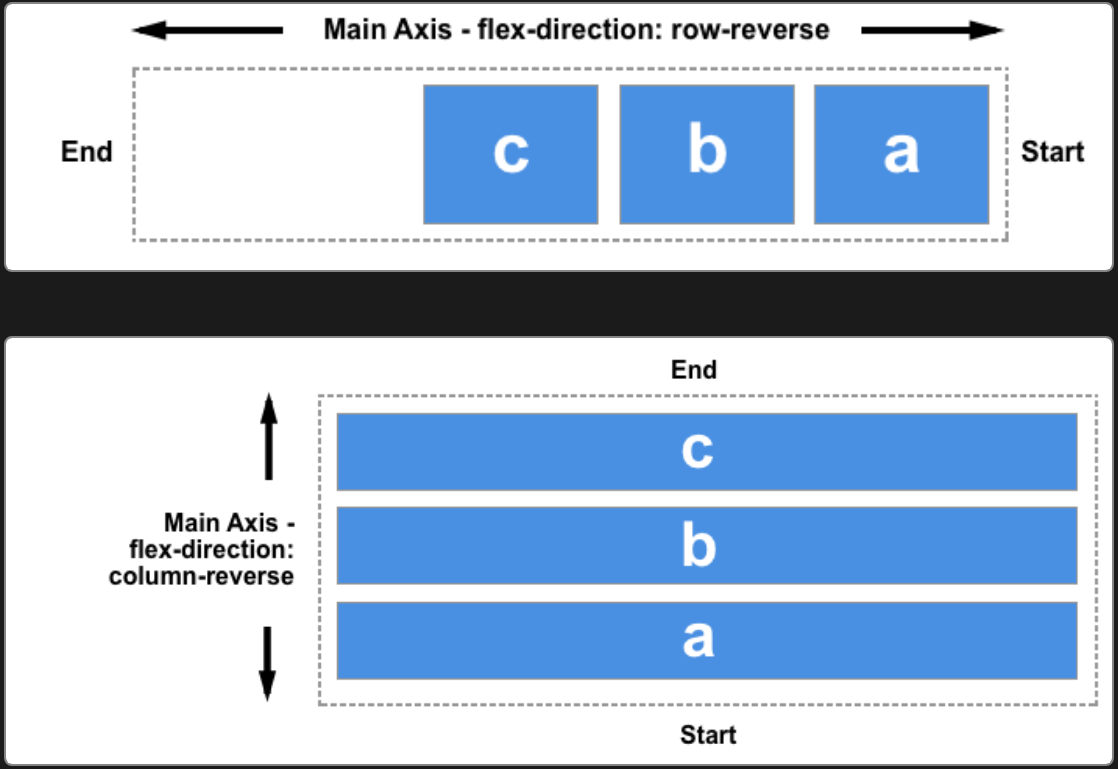
flex-direction:
row.row-reverse.column.column-reverse.
flex-direction will change flex alignment direction and start line:
Wrap
flex-wrap:
nowrap: 不换行.wrap: 换行.wrap-reverse.
Alignment
Parent
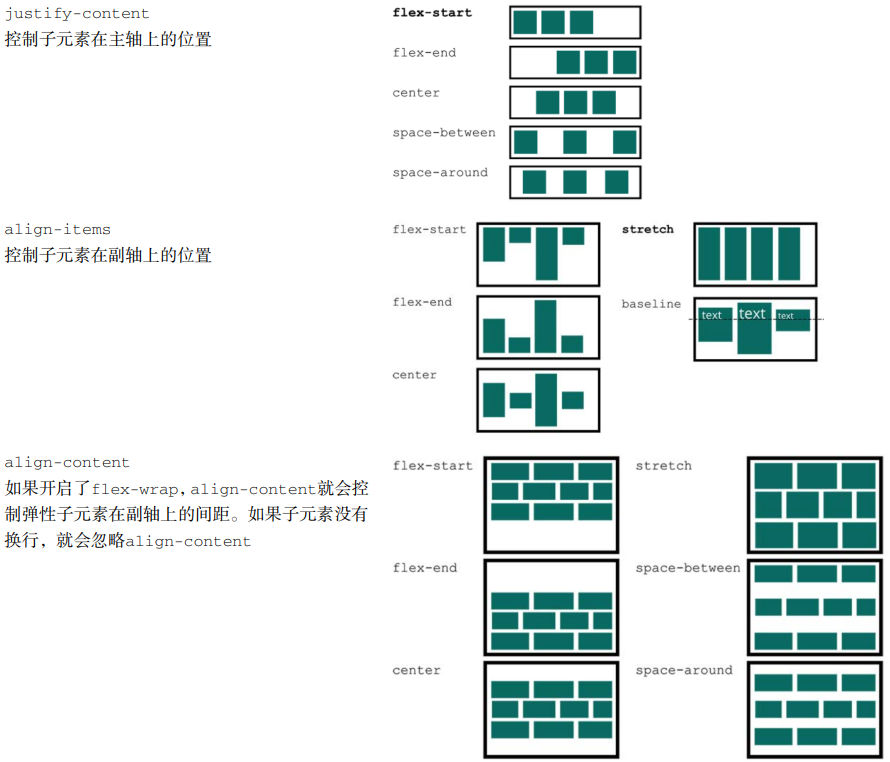
justify-content, defines alignment along main axis:normal: items packed in default position.stretch: behaves asflex-start(stretching in main axis controlled byflex).space-between/space-around/space-evenly.center/start/end/flex-start/flex-end.left/right.
align-items, defines alignment (align-self) for cross axis:normal: behaves asstretch/start.baseline.stretch.center/start/end/self-start/self-end/flex-start/flex-end.
align-content, aligns flex container's lines within when there is extra space in the cross-axis:normal: items packed in default position.baseline.stretch/space-between/space-around/space-evenly.center/start/end/flex-start/flex-end.
*-contentadjust parent padding,*-itemsand*-selfadjust children margin.
Children
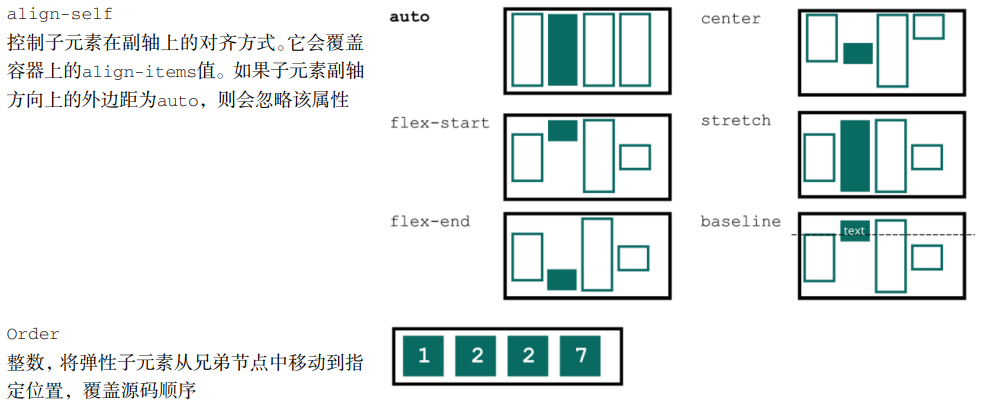
align-self:auto: computes to parentalign-itemsvalue.normal: behaves asstretch/start.baseline.stretch.center/start/end/self-start/self-end/flex-start/flex-end.
order:<number>, 显示顺序, 初始为0.
Auto Margin
Aligning with auto margin:
<div class="parent">
  <div class="child"></div>
</div>

<style>
  .parent {
    display: flex;
  }

  .child {
    /* This will push child to the right of parent border */
    margin-left: auto;
  }
</style>
最后一行左对齐:
.container {
  display: flex;
  flex-wrap: wrap;
  justify-content: space-between;
}

.list {
  margin: 10px;
}

.list:last-child {
  margin-right: auto;
}
Centering
/* 子元素全部居中对齐 */
.vertical-container {
  display: flex;
  align-items: center;
  justify-content: center;
  height: 300px;
}
.layer {
  display: flex;
  flex-grow: 1;
  flex-direction: row;
  align-items: center;
  justify-content: flex-start;
  margin: 5px;
  background-color: #fff;
  border: 1px solid #000;
}
Pseudo Element
Set flex to pseudo elements of flex box
will change width of pseudo elements.
.flex {
  display: flex;
}

.flex::before {
  position: relative; /* no need for absolute position */
  display: block;
}
Fixed Sidebar
<body>
  <aside></aside>
  <main></main>
</body>
body {
  display: flex;
  height: 100vh;
  margin: 0;
}

aside {
  flex: 0 0 auto; /* inflexible */
}

main {
  flex: 1 1 auto; /* auto flexible */
  overflow: auto;
}