Selectors
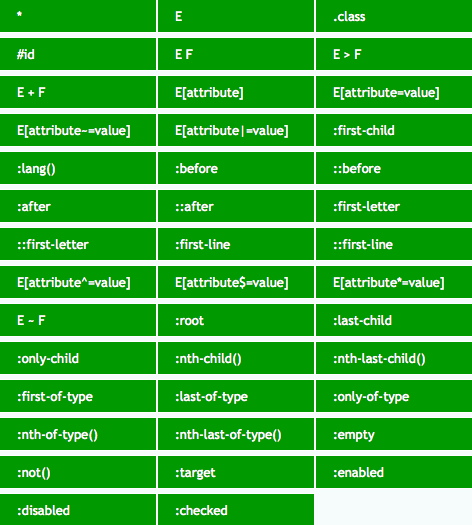
Universal
*:
- 不影响选择器优先级.
- 匹配自定义元素,
<script>,<style>,<title>. - 不匹配伪元素.
Type
p {
  margin-bottom: 1em;
  line-height: 1.5em;
}
Attribute
E[attr]:
/* 定位页面里所有具有必填属性 "required" 的 input */
input[required] {
  border: 1px solid #f00;
}
E[attr=value] match value:
/* 定位页面里的密码输入框 */
input[type='password'] {
  border: 1px solid #aaa;
}
E[attr|=value] match value/value-:
/**
 * 定位页面里所有的 pre 里具有 class 属性且属性值为 language 或是 language- 开头的
 * 比如 class="language", class="language-tsx"
 */
pre[class|='language'] {
  color: #333;
}
E[attr~=value] match value/* value *:
/**
 * 定位页面里所有具有属性 title 且属性值里拥有完整单词 english 的 div 容器
 * 比如 title="english", title="a english"
 */
div[title~='english'] {
  color: #f88;
}
E[attr^=value] match ^value:
/**
 * 定位页面里具有属性 class 且属性值以 a 开头的 div 容器
 * 比如 class="a", class="ab"
 */
div[class^='a'] {
  color: #666;
}
E[attr$=value] match value$:
/**
 * 定位页面里具有属性 class 且属性值以 a 结尾的 div 容器
 * 比如 class="nba", class="cba"
 */
div[class$='a'] {
  color: #f00;
}
E[attr*=value] match *value*:
/* 定位所有 title 里具有 link 字符串的 a 链接 */
a[title*='link'] {
  text-decoration: underline;
}
Descendant
E F 后代选择器:
ul li {
  margin-bottom: 0.5em;
}
Using the descendant selector without more specificity can be really expensive. The browser is going to check every descendant element for a match because the relationship isn't restricted to parent and child.
For .container ul li a selector:
- match every
<a>on the page - find every
<a>contained in a<li> - use the previous matches and narrow down to
the ones contained in a
<ul> - finally, filter down the above selection to
the ones contained in an element with the class
.container
Child
E > F 子代选择器:
ul > li {
  list-style: none;
} /* 仅限ul的直接子元素li, 忽略嵌套子元素 */
General Sibling
E ~ F 一般兄弟选择器:
/* p before h1 */
p {
  color: #fff;
}

/* 定位具有相同父元素的, h1标签之后的所有p标签 */
h1 ~ p {
  color: #f00;
}
Checkbox input as hidden click event listener:
input.checkbox {
  visibility: hidden;
  opacity: 0;
}

nav {
  transform: scale(0);
}

input.checkbox:checked ~ nav {
  transform: scale(1);
}
Adjacent Sibling
E + F 相邻兄弟选择器:
* + * {
  margin-top: 1.5em;
}
li + li {
  border-top: 1px solid #ddd;
}
Location
Link
:link:
- 只匹配未访问的
<a href>. - 可用
a/[href]选择器代替.
Visited
:visited:
- 只匹配访问过的
<a href>. - 只支持设置颜色:
color/background-color/outline-color/border-color/column-rule-color/text-decoration-color. - 不支持颜色透明度 (
alpha). - 只支持重置已有颜色, 不能新增设置样式.
window.getComputedStyle无法获取到:visited设置颜色.
Any Link
:any-link:
- 同时匹配
:link与:visited元素. - 匹配所有设置了
[href]的链接元素:<a href>/<link href>/<area href>.
Target
:target:
- 该选择器定位当前活动页面内定位点的目标元素 (#anchor-name)
#info:target {font-size:24px;}. - 可用于实现 tab/modal/carousel/gallery/slide:
- 利用
display:none隐藏#id元素, 不会触发页面滚动 (防止页面抖动), 可以触发:target伪类匹配. :target ~ .content控制实际内容切换.
- 利用
<a href="#p1">p1</a>
<div id="p1">p1</div>

<style>
  div:target {
    background-color: purple;
  }
</style>
.anchor {
  display: none;
}

.content {
  max-height: 0;
}

.anchor:target ~ .content {
  max-height: 100%;
}
:target-within:
- Selected when any children targeted.
User Action
Hover
- 鼠标移动到容器时的状态.
- 不仅限于链接, 可用于页面中的任何元素.
Active
:active:
- 点击 (mouse click/screen touch) 时的状态.
- 键盘访问无法激活
:active. - 不仅限于链接, 可用于任何具有
tabindex属性的元素.
:link —> :visited —> :hover —> :active links:
/* Unvisited links */
a:link {
  color: blue;
}

/* Visited links */
a:visited {
  color: purple;
}

/* Hovered links */
a:hover {
  background: yellow;
}

/* Active links */
a:active {
  color: red;
}
[href]:active,
button:active,
[type='button']:active,
[type='reset']:active,
[type='submit']:active {
  outline: 999px solid rgb(0 0 0 / 5%);
  outline-offset: -999px;
  background: linear-gradient(rgb(0 0 0 / 5%), rgb(0 0 0 / 5%));
  box-shadow: inset 0 0 0 999px rgb(0 0 0 / 5%);
  clip-path: polygon(0 0, 100% 0, 100% 100%, 0 100%);
}
Focus
:focus:
- 获得焦点时的状态 (包括键盘访问).
- 不仅限于
<a href>/<button>/<input>/<select>/<area>/<summary>, 可用于任何具有tabindex/contenteditable属性的元素.
:focus-visible:
- Selected when
Tab(keyboard) focused. - 可用于区分鼠标与键盘激活样式.
Separate focus styles:
/* Tab Focus Style */
.button:focus-visible {
  outline: 2px solid #416dea;
  outline-offset: 2px;
  box-shadow: 0 1px 1px #416dea;
}

/* Mouse Focus Style */
.button:focus:not(:focus-visible) {
  outline: none;
}
:focus-within:
- Selected when any children focused.
- 可用于实现
dropdown.
.dropdown-list {
  display: none;
}

.dropdown:focus-within .dropdown-list {
  display: block;
}
Input
:autofill.:enabled: 匹配启用的界面元素, e.g.input.:disabled: 匹配禁用的界面元素 ([disabled]), e.g.input.:read-only: 匹配其内容无法供用户修改的元素 (<div>/[readonly]).:read-write: 匹配其内容可供用户修改的元素 (<div contenteditable>/<input>).:default: 匹配处于默认状态的表单元素, 可用于默认选项/推荐选项样式.:checked: 匹配处于选中状态的表单元素, 可用于开关选框/多选框样式, e.g. tab, dropdown, modal, carousel, tree, checkbox grid.:indeterminate:- 匹配处于未选状态的单选框元素
<input type="radio">. - 匹配处于半选状态的复选框元素
<input type="checkbox">. - 匹配处于未设置
value的进度条元素<progress>.
- 匹配处于未选状态的单选框元素
:valid: 匹配输入验证有效的表单元素 (<input type>/<input pattern>).:invalid: 匹配输入验证无效的表单元素.:user-invalid: 匹配用户交互后仍然验证无效的表单元素.:in-range: 匹配具有范围限制的元素, 其中该值位于限制范围内, e.g. 具有min和max属性的number和range输入框.:out-of-range: 与:in-range选择相反, 其中该值位于限制范围外.:required: 匹配具有必填属性[required]的表单元素.:optional: 匹配没有必填属性[required]的表单元素.:placeholder-shown: selectinputwith placeholder, 可用于控制输入样式.
@media only screen and (prefers-reduced-motion: reduce) {
  .msg {
    transition: none;
  }
}

.msg {
  opacity: 0;
  transition: opacity 0.2s ease-in-out;
}

.input:not(:placeholder-shown) ~ .label,
.input:focus ~ .label {
  opacity: 1;
}
Structural
:root:- 根元素, 始终指 html 元素.
:root选择器优先级高于html选择器.- 为了代码可读性,
:root用于设置全局变量,html用于设置全局样式.
:empty: 没有任何子元素的元素, 不能有注释节点与文本节点.E F:nth-child(n):该选择器定位元素 E 的第 n 个子元素的元素 F,可省略 E.E F:nth-last-child(n): 该选择器定位元素 E 的倒数第 n 个子元素的元素 F,可省略 E.E F:first-child: 第一个孩子.E F:last-child: 最后一个孩子.E F:only-child: 单一后代.E F:nth-of-type(n): 该选择器定位元素 E 的第 n 个 相同类型 子元素,可省略 E.E F:nth-lash-of-type(n): 该选择器定位元素 E 的导数第 n 个 相同类型 子元素,可省略 E.E F:first-of-type: 相同类型 的第一个元素.E F:last-of-type: 相同类型 的最后一个元素.E F:only-of-type: 孩子中只有一种该元素.
n start from 0,
calculation result limit to > 0:
:nth-child(5n):0, 5, 10, 15, ...->5, 10, 15, ....:nth-child(3n + 4):4, 7, 10, 13, ...->4, 7, 10, 13, ....:nth-child(-n + 3):3, 2, 1, 0, -1, ...->3, 2, 1.:nth-child(n + 4):nth-child(-n + 10): 两个n分开计算,4, 5, 6, ...+10, 9, 8, ...->4, 5, 6, 7, 8, 9, 10.
li:first-child:nth-last-child(4),
li:first-child:nth-last-child(4) ~ li {
  /* 当列表正好包含 4 项时, 命中所有列表项 */
  color: darkblue;
}

/* stylelint-disable-next-line no-descending-specificity */
li:first-child:nth-last-child(n + 4),
li:first-child:nth-last-child(n + 4) ~ li {
  /* 当列表至少包含 4 项时, 命中所有列表项 */
  color: darkblue;
}

li:first-child:nth-last-child(n + 2):nth-last-child(-n + 6),
li:first-child:nth-last-child(n + 2):nth-last-child(-n + 6) ~ li {
  /* 当列表包含 2 ~ 6 项时, 命中所有列表项 */
  color: darkblue;
}
Logical
:not(<selector>):- Selector priority.
- 选择与括号内的选择器不匹配的元素.
:is(<selector>):- Selector priority.
- Legacy name:
:any()/:matches().
:where(<selector>):0priority.
<target>:has(<selector>):- Selector priority.
- A target element has child elements:
:has(> selector). - A target element has sibling elements:
:has(+ selector).
Is
:is(ol, ul) :is(ol, ul) li {
  margin-left: 2rem;
}
Has
- 父元素选择器: 选择父元素本身, 选择特定父元素的子元素/兄弟元素.
- 兄弟元素选择器:
selector + target与target:has(+ selector)选中不同兄弟元素. - Combined with dataset:
:has([data-theme='dark']),:has([data-disable-scroll='true']). - Combined with structural pseudo class:
:has(:nth-child(4))/:has(:nth-last-child(n + 4)): 包含至少 4 个子元素.:has(:nth-child(5):last-child): 当且仅当包含 5 个子元素.
- State based styling:
:active,:checked,:focus,:focus-visible,:hover. - 可用于实现 conditional styling.
:root {
  &:has(.size-selector [value='xs']:checked) {
    --font-size: 0.8em;
  }

  &:has(.size-selector [value='s']:checked) {
    --font-size: 0.9em;
  }

  &:has(.size-selector [value='m']:checked) {
    --font-size: 1em;
  }

  &:has(.size-selector [value='l']:checked) {
    --font-size: 1.2em;
  }

  &:has(.size-selector [value='xl']:checked) {
    --font-size: 1.5em;
  }

  &:has(.theme-selector [value='dark']:checked) {
    --background: #000;
    --color: #fff;
    --line-color: hotpink;
  }

  &:has(.theme-selector [value='light']:checked) {
    --background: #ddd;
    --color: #000;
    --line-color: darkgoldenrod;
    --button-background: #0001;
  }

  &:has(.theme-selector [value='colorful']:checked) {
    --background: linear-gradient(60deg, maroon, darkblue);
    --color: #aff;
    --line-color: #f55;
    --content-background: #0004;
  }
}

body {
  display: grid;
  place-items: center;
  min-height: 100vh;
  margin: 0;
  font-size: var(--font-size, 1em);
  color: var(--color);
  background: var(--background);
}

h1 {
  text-decoration: underline;
  text-decoration-color: var(--line-color, currentcolor);
}

button {
  padding: 1em 2em;
  color: var(--color);
  background-color: var(--button-background, #fff3);
  border: 2px solid var(--line-color, currentcolor);
}

section {
  width: 100%;
  max-width: 50ch;
  padding: 2em;
  background-color: var(--content-background, none);
}
<!-- card 1 -->
<div class="card">
  <img />
  <span />
</div>

<!-- card 2 -->
<div class="card">
  <span />
</div>

<style>
  /* Match card 1 and card 2 */
  .card:has(:not(img)) {
    color: red;
  }

  /* Match card 2 */
  .card:not(:has(img)) {
    color: blue;
  }
</style>
:has() 内部无法嵌套 :has().
Linguistic
:dir(ltr)/:dir(rtl).:lang(en): 具有使用双字母缩写 (en) 表示的语言的元素.
:lang(en) > q {
  quotes: '\201C' '\201D' '\2018' '\2019';
}

:lang(fr) > q {
  quotes: '<< ' ' >>';
}

:lang(de) > q {
  quotes: '>>' '<<' '\2039' '\203A';
}
Miscellaneous
:fullscreen.
First
::first-letter/::first-line:
::first-letter: 匹配文本首字母.::first-line: 匹配文本首行.- IE9 及以上版本浏览器支持双冒号, IE8 浏览器只支持单冒号写法.
- 只作用于块级元素:
displayblock/inline-block/list-item/table-cell/table-caption. - 只支持部分 CSS 属性:
color.fontproperties:font-size,font-weight.textproperties:text-decoration,word-spacing.backgroundproperties:background-color,background-image.borderproperties:border-color.float.
Selection
::selection 匹配突出显示的文本:
color.background-color.cursor.caret-color.outline.text-decoration.text-emphasis-color.text-shadow.stroke-color.fill-color.stroke-width.
/* 定义选中的文本颜色与背景色 */
::selection {
  color: #fff;
  background: #444;
}
Target Text
::target-text {
  color: white;
  background-color: rebeccapurple;
}
Before and After
使用 content 属性生成额外的内容并插入在标记中:
a::after {
  content: '↗';
}
attr(), 调用当前元素的属性:
a::after {
  content: '(' attr(href) ')';
}

b::after {
  content: '(' attr(data-language) ')';
}
url()/uri(), 用于引用媒体文件:
h1::before {
  content: url('logo.png');
}
counter(), 调用计数器, 可以不使用列表元素实现序号功能,
配合 CSS3 中counter-increment和counter-reset属性:
<div>
  <h2>HTML</h2>
  <h2>CSS</h2>
  <h2>JS</h2>
</div>

<style>
  div {
    counter-reset: tidbit-counter 58;
  }

  h2::before {
    content: counter(tidbit-counter, list-style-type) ': ';
    counter-increment: tidbit-counter 1;
  }
</style>

<!-- output
  59: HTML
  60: CSS
  61: JS
output -->
伪元素可用于扩大可点击区域:
.btn-text::before {
  position: absolute;
  inset: -6px -8px;
  content: '';
}
Backdrop
/* Backdrop is only displayed when dialog is opened with dialog.showModal() */
dialog::backdrop {
  background: rgb(255 0 0 / 25%);
}

video::backdrop {
  background-color: #448;
}
Marker
animation-*.transition-*.color.direction.font-*.content.unicode-bidi.white-space.
li::marker {
  font-variant-numeric: tabular-nums;
  text-align: start;
  text-align-last: start;
  text-indent: 0;
  text-transform: none;
  unicode-bidi: isolate;
}
Shadow DOM
:host: shadow DOM root element.:host-context: shadow DOM root parent element.::part().::slotted().
Focusable
const FocusableSelectors = [
  '[contenteditable]',
  '[tabindex="0"]:not([disabled])',
  'a[href]',
  'audio[controls]',
  'button:not([disabled])',
  'iframe',
  'input:not([disabled]):not([type="hidden"])',
  'select:not([disabled])',
  'summary',
  'textarea:not([disabled])',
  'video[controls]',
].join(',')