Typography

CSS Text

Text Alignment

text-align:

  • 对 block level element 无效.
  • start/end/left/right/center/match-parent.
  • justify: 自适应, 左右都无空格.
.wrap {
text-align: justify;
text-align-last: justify; /* 一个块或行的最后一行对齐方式 */
/* stylelint-disable-next-line declaration-property-value-no-unknown */
text-justify: distribute-all-lines; /* ie6-8 */
}

text-align-last:

最后一行文字对齐方式.

text-justify:

  • type of justification for text-align: justify.
  • none: turn off text-align: justify.
  • auto.
  • inter-word.
  • inter-character.

Text Indent

text-indent:

  • 作用于 block container, 但实际作用于第一行内联盒子内容.
  • display: inline 替换元素无效.
  • display: inline-* 替换元素有效.
  • Percentage text-indent calculate by containing block width.
.hidden-text {
font: 0/0 sans-serif;
color: transparent;
text-indent: -9999px;
}

tab-size:

pre {
font-size: 100%;
tab-size: 2;
white-space: pre-wrap;
}

Text Spacing

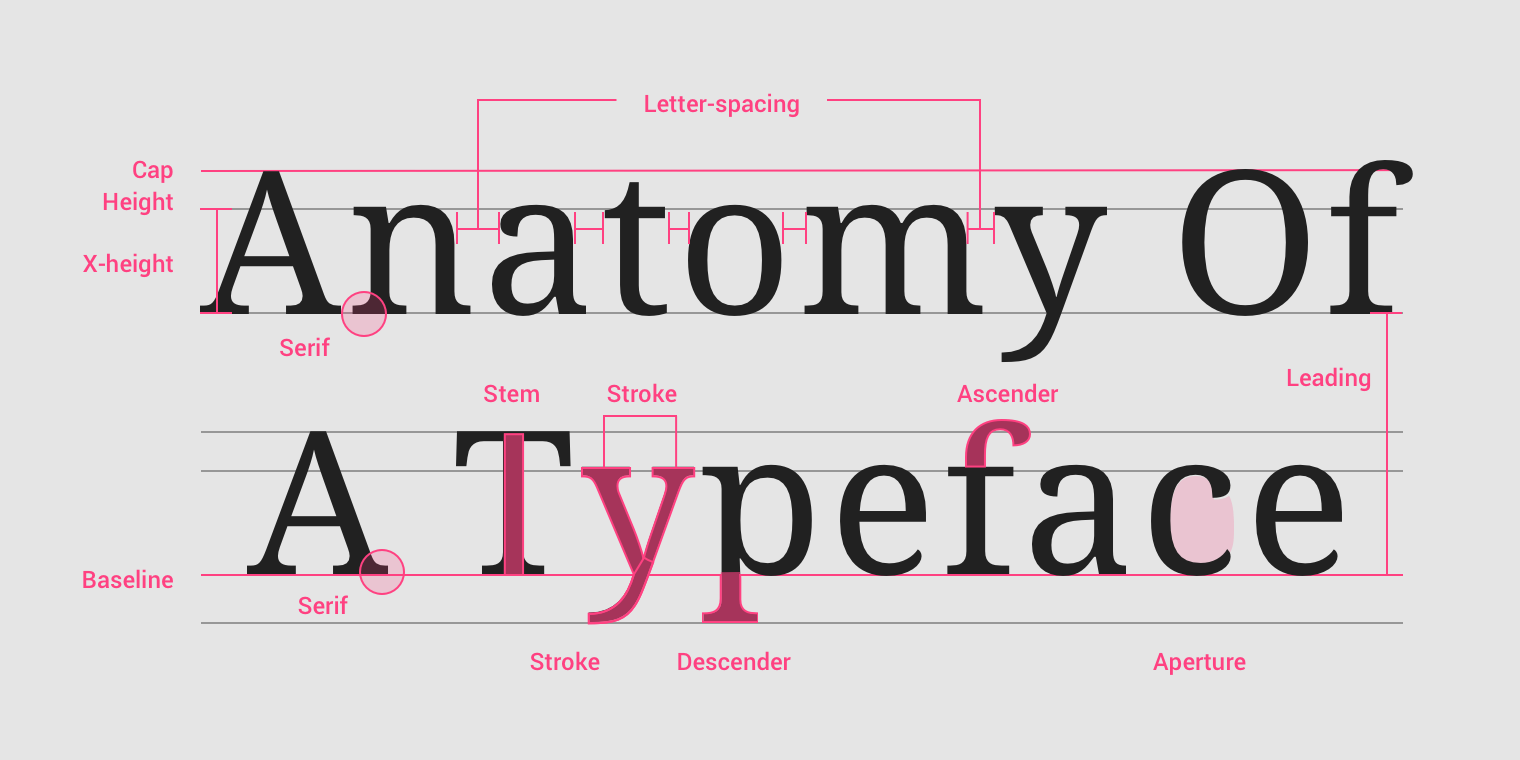
在设计领域, 文本行之间的距离称为行距 (leading), 来源于印刷版每行文字之间添加的一条条的引导线 (lead). 字符之间的距离称之为字距 (tracking). tailwind.css 使用 leading-{size} 控制 line-height, 使用 tracking-{size} 控制 letter-spacing.

letter-spacing:

  • 继承性.
  • 默认值为 normal.
  • 支持负值, 小数值.

word-spacing:

  • 继承性.
  • 默认值为 normal.
  • 支持负值, 小数值, 百分比.
  • 最终间隔距离会受 text-align: justify 影响.
.paragraph {
line-height: 1.5em; /* 行间距 */
text-indent: 2em; /* 段落缩进 */
word-spacing: 50px; /* 词间距 */
letter-spacing: 50px; /* 字间距 */
}

Text Transform

p {
font-variant: small-caps; /* 小型的大写字母 */
text-transform: uppercase; /* 大写字母 */
text-transform: lowercase; /* 小写字母 */
text-transform: capitalize; /* 首字母大写 */
}

Text Decoration

text-decoration:

<'text-decoration-line'> || <'text-decoration-style'> || <'text-decoration-color'> || <'text-decoration-thickness'>.

.line {
text-decoration-line: overline; /* 上划线 */
text-decoration-line: line-through; /* 中划线 */
text-decoration-line: underline; /* 下划线 */
}

.text {
text-decoration: underline;
text-decoration: dotted underline;
text-decoration: red underline dashed;
text-decoration: wavy underline 3px red;
}

.wavy {
display: block;
height: 0.5rem;
padding-top: 0.5rem;
overflow: hidden;
letter-spacing: 100vw;
white-space: nowrap;
}

.wavy::before {
text-decoration: overline; /* IE */
text-decoration-style: wavy;
content: '\2000\2000';
}

更多下划线样式:

Text Emphasis

text-emphasis:

  • <'text-emphasis-style'> || <'text-emphasis-color'>.
  • text-emphasis-style:
    • none.
    • <character>.
    • [ filled | open ] || [ dot | circle | double-circle | triangle | sesame ].
  • text-emphasis-color: currentcolor | <color>.
  • 重点符号字号默认为文字字号的一半.
.text {
/* Initial value */
text-emphasis: none;

/* <string> value */
text-emphasis: 'x';
text-emphasis: '点';
text-emphasis: '\25B2';
text-emphasis: '*' #555;

/* Keywords value */
text-emphasis: filled; /* filled dot */
text-emphasis: open; /* open dot */
text-emphasis: sesame; /* filled sesame */
text-emphasis: open sesame;

/* Keywords value combined with a color */
text-emphasis: filled sesame #555;
}

text-emphasis-position:

  • [ over | under ] && [ right | left ].
  • over: draws marks over text in horizontal writing mode.
  • under: draws marks under text in horizontal writing mode.
  • right: draws marks to right of text in vertical writing mode.
  • left: draws marks to left of text in vertical writing mode.
  • 默认在顶部或右侧画重点符号.
.text {
/* Initial value */
text-emphasis-position: over right;

/* Keywords value */
text-emphasis-position: over left;
text-emphasis-position: under right;
text-emphasis-position: left under;
text-emphasis-position: right over;
}

Text Size Adjust

禁止 iOS 横屏字号自动调整:

body {
/* stylelint-disable-next-line property-no-vendor-prefix */
-webkit-text-size-adjust: none;
}

Text Overflow

  • clip: 切除溢出部分.
  • ellipsis: 省略号标志 (要设置 width).
.truncation-article-container {
width: 500px;
overflow: hidden;
text-overflow: ellipsis;
white-space: nowrap;
}
.article-container {
display: block;
overflow: hidden;
text-overflow: ellipsis;
-webkit-line-clamp: 4; /* 需要显示的行数 */
word-break: break-all;
-webkit-box-orient: vertical;
}

White Space

Web default:

  • 空格被解析为换行.
  • 换行被解析为空格.
  • 自动合并空格.

普通标签内自动忽略空格符, 并将其与空白符转换成一个空格进行输出, 可用 white-space 改变这一行为:

White Space换行符空格和制表符文字换行行尾空格
normal合并合并换行删除
nowrap合并合并不换行删除
pre保留保留不换行保留
pre-wrap保留保留换行挂起
pre-line保留合并换行删除
break-spaces保留保留换行换行
dd + dt::before {
white-space: pre;
content: '\A';
}

dd + dd::before {
margin-left: -0.25em;
font-weight: normal;
content: ', ';
}

Text Wrap

Text wrapping and word breaking:

  • word-break:
    • normal: default line break rule.
    • keep-all: Word breaks should not be used for CJK text. Non-CJK text behavior is same as for normal.
    • break-all: word breaks should be inserted between any two characters (excluding CJK text).
  • overflow-wrap:
    • normal.
    • anywhere.
    • break-word.
  • line-break (break lines of CJK text when working with punctuation and symbols):
    • auto.
    • loose.
    • normal.
    • strict.
    • anywhere.
  • hyphens (how words should be hyphenated when text wraps across multiple lines):
    • manual: words are broken for line-wrapping only where - or &shy;.
    • auto: automatically break words at appropriate hyphenation points.
    • none: words are not broken at line breaks.
  • <wbr>: word break opportunity.
/* 不换行 */
.nowrap {
white-space: nowrap;
}

/* 自动换行 */
.auto-wrap {
hyphens: auto;
line-break: anywhere;
word-break: normal;
overflow-wrap: break-word;
}

/* 自动换行 */
pre {
hyphens: auto;
line-break: anywhere;
/* stylelint-disable-next-line property-no-deprecated */
word-wrap: break-word; /* IE 5.5-7 */
white-space: pre-wrap; /* Modern Browsers */
}

/* 强制换行 */
.force-wrap {
line-break: anywhere;
word-break: break-all;
}

/* IE not support <wbr> */
wbr::after {
content: '\00200B';
}
Punctuation Types
  • 避头标点: 不在行首显示的标点, e.g. 逗号, 顿号, 句号, 问号, 叹号.
  • 避尾标点: 不在行尾显示的标点, e.g. 前引号, 前括号.
.text-truncate-box {
display: inline-block;
max-width: 250px;
overflow: hidden;
text-overflow: ellipsis;
overflow-wrap: normal;
white-space: nowrap;
}

Text Horizontal Direction

Direction

Set direction of text, table columns, and horizontal overflow:

.ltr {
direction: ltr;
}

.rtl {
direction: rtl;
}

Unicode Bidi

unicode-bidi:

  • normal.
  • plaintext: 元素内文字 LTR.
  • embed: 中英文字符 LTR, 标点符号 RLT.
  • isolate: 中英文字符 LTR, 标点符号 RLT.
  • bidi-override: 所有字符 RTL.
  • isolate-override: 所有字符 RTL.
<p><button>button按钮?</button><span>span标签?</span>匿名内联元素?</p>

<style>
p {
direction: rtl;
}

span {
background-color: skyblue;
}
</style>

Unicode Bidi

Text Vertical Direction

Writing Mode

Set whether lines of text are laid out horizontally or vertically:

/* 单列展示 */
.wrap-single {
width: 25px;
height: auto;
padding: 8px 5px;
font-size: 12px;
line-height: 18px;
hyphens: auto;
overflow-wrap: break-word; /* 英文自动换行 */
}

/* 多列展示 */
.wrap-multiple {
height: 200px;
line-height: 30px;
text-align: justify;
writing-mode: horizontal-tb; /* 水平排列 */
writing-mode: vertical-lr; /* 竖直从左向右 */
writing-mode: vertical-rl; /* 竖直从右向左 */
writing-mode: lr-tb; /* IE: 水平排列 */
/* stylelint-disable-next-line declaration-property-value-no-unknown */
writing-mode: tb-lr; /* IE: 竖直从左向右 */
writing-mode: tb-rl; /* IE: 竖直从右向左 */
}

Text Orientation

text-orientation:

  • mixed: 中文字符正立, 英文字符旋转 90 度.
  • upright: 中文字符正立, 英文字符正立.
  • sideways/sideways-right: 中文字符旋转 90 度, 英文字符旋转 90 度.

Text Combine Upright

text-combine-upright:

  • none.
  • all: 横向合并所有类型字符.
  • digits <integer>?: 横向合并数字字符.

CSS Font

Font Family

Generic Font Family

  • serif: 衬线字体族.
  • sans-serif: 无衬线字体族.
  • monospace: 等宽字体族.
  • cursive: 手写字体族.
  • fantasy: 奇幻字体族.
  • emoji: 表情字体族.
  • math: 数学表达式字体族.
  • fangsong: 仿宋字体族.
  • system-ui: 系统 UI 字体族.
  • ui-serif: 系统衬线字体.
  • ui-sans-serif: 系统无衬线字体.
  • ui-monospace: 系统等宽字体.
  • ui-rounded: 系统圆形字体.

English Font Family

  • Segoe UI: Windows 从 Vista 版本开始默认的西文字体族.
  • Roboto: Android 中的一款无衬线字体.
  • Helvetica: macOS 和 iOS 中很常用的一款无衬线字体.
  • Arial: 全平台都支持的一款无衬线字体.
body {
font-family:
system-ui,
-apple-system,
'Segoe UI',
Roboto,
Helvetica,
Arial,
sans-serif;
}

Emoji Font Family

  • Apple Color Emoji: macOS and iOS.
  • Segoe UI Emoji: Windows.
  • Segoe UI Symbol: Windows 7 新增字体, 是一种 Unicode 编码字体, 显示的是单色图案, 非彩色图形.
  • Noto Color Emoji: 谷歌出品的 emoji 字体, 用于 Android 和 Linux.
@font-face {
font-family: emoji;
src: local('Apple Color Emoji'), local('Segoe UI Emoji'), local('Segoe UI Symbol'), local('Noto Color Emoji');
font-display: swap;
unicode-range: U+1F000-1F644, U+203C-3299;
}

body {
font-family:
system-ui,
-apple-system,
'Segoe UI',
Roboto,
emoji,
Helvetica,
Arial,
sans-serif;
}

Icon Font Family

  • Complete guide on how to pair icons and typefaces to create consistent visual language (including awesome fonts list).

Math Font Family

  • Cambria Math: Windows 中的数学字体.
  • Latin Modern Math: macOS 中的数学字体.
math {
font-family: 'Cambria Math', 'Latin Modern Math', serif;
}

Chinese Font Family

宋体 SimSun
黑体 SimHei
微软雅黑 Microsoft YaHei
微软正黑体 Microsoft JhengHei
新宋体 NSimSun
新细明体 PMingLiU
细明体 MingLiU
标楷体 DFKai-SB
仿宋 FangSong
楷体 KaiTi
仿宋_GB2312 FangSong_GB2312
楷体_GB2312 KaiTi_GB2312

宋体: SimSun
华文细黑: STHeiti Light [STXihei]
华文黑体: STHeiti
华文楷体: STKaiti
华文宋体: STSong
华文仿宋: STFangsong
儷黑 Pro: LiHei Pro Medium
儷宋 Pro: LiSong Pro Light
標楷體: BiauKai
蘋果儷中黑: Apple LiGothic Medium
蘋果儷細宋: Apple LiSung Light

新細明體: PMingLiU
細明體: MingLiU
標楷體: DFKai-SB
黑体: SimHei
新宋体: NSimSun
仿宋: FangSong
楷体: KaiTi
仿宋_GB2312: FangSong_GB2312
楷体_GB2312: KaiTi_GB2312
微軟正黑體: Microsoft JhengHei
微软雅黑体: Microsoft YaHei

隶书: LiSu
幼圆: YouYuan
华文细黑: STXihei
华文楷体: STKaiti
华文宋体: STSong
华文中宋: STZhongsong
华文仿宋: STFangsong
方正舒体: FZShuTi
方正姚体: FZYaoti
华文彩云: STCaiyun
华文琥珀: STHupo
华文隶书: STLiti
华文行楷: STXingkai
华文新魏: STXinwei

Font Family Preset

Font stack:

.mi {
font-family: Arial, 'Microsoft YaHei', '黑体', '宋体', sans-serif;
}

.tao-ux {
font-family: Helvetica, 'Hiragino Sans GB', 'Microsoft Yahei', '微软雅黑', Arial, sans-serif;
}

.tao {
font:
12px/1.5 Tahoma,
Helvetica,
Arial,
'宋体',
sans-serif;
}

.tao-ued {
font:
12px/1 Tahoma,
Helvetica,
Arial,
'\5b8b\4f53',
sans-serif;
}

.one-plus {
font:
14px/1.5 'Microsoft YaHei',
Arial,
Tahoma,
'\5b8b\4f53',
sans-serif;
}

.github {
font-family:
-apple-system, BlinkMacSystemFont, 'Segoe UI', Helvetica, Arial, sans-serif, 'Apple Color Emoji', 'Segoe UI Emoji';
}

.font-sans-serif {
font-family:
-apple-system, BlinkMacSystemFont, 'Avenir Next', Avenir, 'Segoe UI', 'Helvetica Neue', Helvetica, Cantarell,
Ubuntu, Roboto, Noto, Arial, sans-serif;
}

.font-serif {
font-family:
Georgia, Cambria, 'Iowan Old Style', 'Apple Garamond', Baskerville, 'Times New Roman', 'Droid Serif', Times,
'Source Serif Pro', serif, 'Apple Color Emoji', 'Segoe UI Emoji', 'Segoe UI Symbol';
}

.font-mono {
font-family: Menlo, Consolas, Monaco, 'Liberation Mono', 'Lucida Console', 'Courier New', monospace;
}

Font Size

  • ch: calculate by 0 width.
  • ex: calculate by x width.
  • em:
    • Calculate by original font-size (inherit size or current size).
    • 当用 em 指定多重嵌套的元素的字号时, 会产生不断放大/缩小的结果, 故一般避免在 font-size 上使用 em.
    • margin/padding/border 上使用 em 时, 可使得布局随 font-size 大小改变而改变.
  • rem: calculate by root font-size.
  • <percentage>: calculate by parent font-size.
html {
/* 浏览器默认size为16px, 此时将html-size自动计算为10px */
font-size: 62.5%;
}

small {
/* 11px */
font-size: 1.1rem;
}

strong {
/* 18px */
font-size: 1.8rem;
}

Font Size Adjust

font-size-adjust:

  • 使字体保持大小, 不随字体类型改变而改变.
  • 不同字体有不同的值 (x-height/字体尺寸).

Font Stretch

font-stretch, selects a normal, condensed, or expanded face from a font:

  • normal.
  • ultra-condensed | extra-condensed | condensed | semi-condensed.
  • semi-expanded | expanded | extra-expanded | ultra-expanded.
  • <percentage>.
KeywordPercentage
ultra-condensed50%
extra-condensed62.5%
condensed75%
semi-condensed87.5%
normal100%
semi-expanded112.5%
expanded125%
extra-expanded150%
ultra-expanded200%

Font Kerning

font-kerning, 字距调整:

  • auto.
  • normal: enable kerning.
  • none: disable kerning.

Font Style

font-style:

  • normal.
  • italic.
  • oblique.
  • oblique <angle>.

Font Synthesis

font-synthesis:

  • Controls which missing typefaces, bold, italic, or small-caps may be synthesized by the browser.
  • Initial value: weight style.
  • Formal syntax: none | [ weight || style || small-caps ].
<em class="syn">Synthesize me! 站直。</em>
<br />
<em class="no-syn">Don't synthesize me! 站直。</em>

<style>
em {
font-weight: bold;
}

.syn {
font-synthesis: style weight small-caps;
}

.no-syn {
font-synthesis: none;
}
</style>

Font Synthesis

Font Variant

font-variant:

  • normal.
  • none.
  • font-variant-caps:
    • small-caps: 小体型大写字母.
    • all-small-caps.
    • petite-caps: 特小型大写字母.
    • all-petite-caps.
    • unicase: 混合模式, 可以有小体型大写字母, 大写字母, 大体型小写字母.
    • titling-caps: 标题大写字母.
  • font-variant-east-asian:
    • ruby: 日文上标假名.
    • jis78/jis83/jis90/jis04: 使用对应年份的日语字符集.
    • simplified: 简体字形.
    • traditional: 繁体字形.
    • proportional-width: 不等宽字形.
    • full-width: 等宽字形.
  • font-variant-ligatures:
    • common-ligatures: 使用连字效果.
    • discretionary-ligatures: 使用特殊连字效果, 设计师设计具体效果表现.
    • historical-ligatures: 使用古代连字效果.
    • contextual-ligatures: 使用上下文连字效果, 前后字母影响具体效果表现.
  • font-variant-numeric:
    • ordinal: 强制使用序数标记特殊的标志符号, e.g. 1st, 2nd, 3rd, 4th.
    • slashed-zero: 强制使用带斜线的 0.
    • lining-nums: 沿基线对齐.
    • oldstyle-nums: 传统对齐方式.
    • proportional-nums: 不等宽数字.
    • tabular-nums: 等宽数字.
    • diagonal-fractions: 斜线分隔分子母
    • stacked-fractions: 水平线分隔分子母.

Font Display

The font display timeline:

  • block period: font face is not loaded, render an invisible fallback font face (use normally when loaded in this period)
  • swap period: font face is not loaded, render a fallback font face (use normally when loaded in this period)
  • failure period: the user agent treats it as a failed load causing normal font fallback

font-display decides how a font face is displayed based on whether and when it is downloaded and ready to use:

  • auto: font display strategy defined by the user agent.
  • block: a short block period and an infinite swap period.
  • swap: an extremely small block period and an infinite swap period.
  • fallback: an extremely small block period and a short swap period.
  • optional: an extremely small block period and no swap period.
@font-face {
font-family: ExampleFont;
font-style: normal;
font-weight: 400;
src:
url('/path/to/fonts/exampleFont.woff') format('woff'),
url('/path/to/fonts/exampleFont.eot') format('eot');
font-display: fallback;
}

Custom Font Face

@font-face 使用户使用自定义字体:

@font-face {
font-family: mySpecialFont;
font-style: normal;
font-weight: 400;
src: url('./Colleen.ttf');
font-display: swap;
}

.selector {
font-family: mySpecialFont, sans-serif;
}

Custom Font Format

@font-face {
font-family: 'Open Sans Regular';
font-style: normal;
font-weight: 400;
src:
local('Open Sans Regular'),
local('OpenSans-Regular'),
url('open-sans/OpenSans-Regular-Cyrillic.woff2') format('woff2'),
url('open-sans/OpenSans-Regular-Cyrillic.woff') format('woff'),
url('open-sans/OpenSans-Regular-Cyrillic.eot') format('embedded-opentype'),
url('open-sans/OpenSans-Regular-Cyrillic.ttf') format('truetype');
font-display: swap;
unicode-range: U+0400-045F, U+0490-0491, U+04B0-04B1;
}

Custom Font Style and Weight

@font-face {
font-family: myFont;
font-weight: 400;
src: local('Font 40S');
}

@font-face {
font-family: myFont;
font-weight: 500;
src: local('Font 50S');
}

@font-face {
font-family: myFont;
font-weight: 600;
src: local('Font 60S');
}

@font-face {
font-family: myFont;
font-style: italic;
src: local('Font Italic');
}

.text-normal,
.text-medium,
.text-semibold,
.text-italic {
font-family: myFont, sans-serif;
}

.text-normal {
font-weight: 400;
}

.text-medium {
font-weight: 500;
}

.text-semibold {
font-weight: 600;
}

.text-italic {
font-style: italic;
}

Font Performance

Reduce web font size:

  • Compress fonts: better formats (e.g. woff2/woff).
  • Subset fonts: unicode-range.
  • Local fonts: local().
@font-face {
/* Single value */
unicode-range: U+0026;
}

@font-face {
/* Range */
unicode-range: U+0000-007F;
}

@font-face {
/* Wildcard Range */
unicode-range: U+002?;
}

@font-face {
/* Multiple Values */
unicode-range: U+0000-007F, U+0100, U+02??;
}

CSS Content

content replaces an element with a generated value:

  • Objects inserted are Anonymous Replaced Elements.
  • CSS-generated content is not included in the DOM, will not be represented in accessibility tree.

CSS Counter

Adjust the appearance of content based on its location in a document.

/* Set a counter named 'section', and its initial value is 0. */
body {
counter-reset: section;
}

/* Increment the value of section counter by 1 */

/* Display the value of section counter */
h3::before {
content: counter(section);
counter-increment: section;
}

Nested counters counters(counterName, hyphenString):

ol {
list-style-type: none;
counter-reset: section; /* 为每个ol元素创建新的计数器实例 */
}

li::before {
content: counters(section, '.') ' '; /* 为所有计数器实例增加以`.`分隔的值 */
counter-increment: section; /* 只增加计数器的当前实例 */
}
<ol>
<li>item</li>
<!-- 1 -->
<li>
item
<!-- 2 -->
<ol>
<li>item</li>
<!-- 2.1 -->
<li>item</li>
<!-- 2.2 -->
<li>
item
<!-- 2.3 -->
<ol>
<li>item</li>
<!-- 2.3.1 -->
<li>item</li>
<!-- 2.3.2 -->
</ol>
<ol>
<li>item</li>
<!-- 2.3.1 -->
<li>item</li>
<!-- 2.3.2 -->
<li>item</li>
<!-- 2.3.3 -->
</ol>
</li>
<li>item</li>
<!-- 2.4 -->
</ol>
</li>
<li>item</li>
<!-- 3 -->
<li>item</li>
<!-- 4 -->
</ol>
<ol>
<li>item</li>
<!-- 1 -->
<li>item</li>
<!-- 2 -->
</ol>