Loading
Critical Path
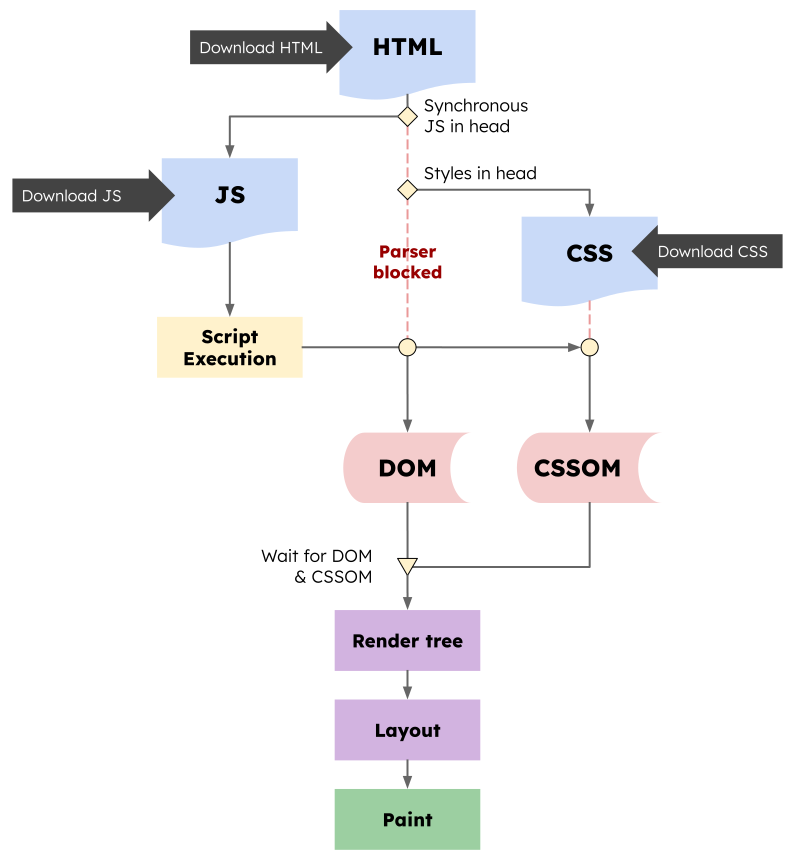
Render blocking resources are files that 'press pause' on the critical rendering path. They interrupt one or more of the steps:
- HTML is technically render blocking resources (but not usually the cause of rendering performance problem)
- CSS is render blocking: render tree can't continue until both the CSSOM and DOM are created.
- JavaScript can be render blocking: when browser encounters a script meant to run synchronously, it will stop DOM creation until script finished.
- If CSS appears before a script, the script will not be executed until the CSSOM is created: CSSOM -> CSS block JS -> JS block HTML parser.
- Images and fonts are not render blocking.
- Reduce CSS and JavaScript bytes.
- Lazy loading non-critical CSS and JavaScript.
- Use the
defer,async, ormoduleattribute on scripts.
Preloading
- Generally, preloads will load in order parser gets to them for anything >=
Medium. - Font preloads are probably best towards end of
<head>or beginning of<body>. - Import preloads should be done after
<script>tag that needs the import. - Image preloads will have a low priority (async scripts).
Role of preload scanner is speculative, meaning that it examines raw markup (not scan CSS) in order to find resources to opportunistically fetch before the primary HTML parser would otherwise discover them.
The preload scanner discovers the <img> element
even while rendering and document parsing is blocked,
the preload scanner will discover and fetch the image resource more quickly.
<link rel="modulepreload" href="critical-module.mjs" />
<link rel="preload" as="script" href="critical.js" />
<link rel="preload" as="fetch" href="..." crossorigin />
<link rel="preload" as="font" href="myFont.woff2" type="font/woff2" crossorigin />
<link
  rel="preload"
  as="image"
  href="keyboard.jpg"
  imagesrcset="poster_400px.jpg 400w, poster_800px.jpg 800w, poster_1600px.jpg 1600w"
  imagesizes="50vw"
/>
<link rel="preload" as="video" href="https://cdn.com/small-file.mp4" />
Preload scanner can be defeated (can't discover resources quickly):
- Injecting resources (scripts/images/styles) into DOM with JavaScript.
- Lazy-loading above-the-fold images or iframes using JavaScript solution.
- Rendering markup on client that contain document sub-resources using JavaScript.
Prefetching
Quick Link prefetch:
<link rel="prefetch" href="hero.jpg" as="image" />
Pre-fetch and pre-render pitfalls:
- Avoid prefetching pages for authentication.
- Avoid over-prefetching to limit accidental DOS.
- Avoid prefetching pages key to checkout.
- Avoid prefetching large resources.
- Avoid prefetching cross-origin resources.
Priority
<!-- link: initiate an early fetch but de-prioritize the script -->
<link href="/js/script.js" rel="preload" as="script" fetchpriority="low" />

<!-- img: de-prioritize an image in viewport -->
<!-- that could be otherwise prioritized by the browser -->
<img src="/images/in-viewport-but-unimportant.svg" fetchpriority="low" alt="" />

<!-- script: prioritize critical script -->
<script src="/js/live-chat.js" fetchpriority="high"></script>

<!-- iframe: de-prioritize a third-party embed that’s not essential -->
<iframe src="https://example.com" width="400" height="400" fetchpriority="low"></iframe>

<script>
  // Critical Fetch request for article content
  fetch('/api/articles.json', { priority: 'high' }).then(/*...*/)

  // Request for related content now reduced in priority
  fetch('/api/related.json', { priority: 'low' }).then(/*...*/)
</script>
Images
Lazy Loading Polyfill:
<img data-src="flower.jpg" class="lazyload" />
window.addEventListener('scroll', (event) => {
  Array.from(document.querySelectorAll('.lazyload')).forEach((image) => {
    if (image.slideIntoView(event.getBoundingClientRect())) {
      image.setAttribute('src', image.dataset.src)
    }
  })
})
Observer Lazy Loading:
const observer = new IntersectionObserver((nodes) => {
  nodes.forEach((v) => {
    if (v.isIntersecting) {
      v.target.src = v.target.dataset.src
      observer.unobserve(v.target)
    }
  })
})

const images = document.querySelectorAll('img.lazyload')
images.forEach(v => observer.observe(v))
Native Lazy Loading:
<img src="flower.jpg" lazyload="auto" />
<img src="flower.jpg" lazyload="on" />
<img src="flower.jpg" lazyload="off" />
Scripts
- Script Priorities
async: downloads script during parsing document, but will pause parser to execute script.defer: downloads script during parsing document, and waits until document has finished parsing before executing it.- If the script is independent, use
async. - If the scripts rely on each other, use
defer. - If put JavaScript in
<head>, in such script can't access DOM directly (DOM haven't get parsed). - Lazy loading scripts not execute immediately (Chrome coverage devtools).

<script src="myScript.js"></script>
<script src="myScript.js" async></script>
<script src="myScript.js" defer></script>
const DetailsComponent = lazy(() => import('./details'))

export default function PageComponent() {
  return (
    <Suspense fallback={<div>Loading...</div>}>
      <DetailsComponent />
    </Suspense>
  )
}
Lazy Loading
<html>
  <body>
    ... The full body of the page ...
    <script>
      window.onload = function () {
        const script = document.createElement('script')
        script.src = 'all_lazy_20100426.js'
        script.async = true
        document.documentElement.firstChild.appendChild(script)
      }
    </script>
  </body>
</html>
Dynamic Loading
function requireScript(file, callback) {
  const script = document.getElementsByTagName('script')[0]
  const newJS = document.createElement('script')

  // IE
  newJS.onreadystatechange = function () {
    if (newJS.readyState === 'loaded' || newJS.readyState === 'complete') {
      newJS.onreadystatechange = null
      callback()
    }
  }
  // others
  newJS.onload = function () {
    callback()
  }

  // 添加至 HTML 页面
  newJS.src = file
  newJS.async = true
  script.parentNode.insertBefore(newJS, script)
}

requireScript('the_rest.js', () => {
  Application.init()
})
Babel
modules: alwaysfalse, keepesmfor bundler (e.g. webpack) tree shaking.useBuiltIns:entry: 将core-js import替换为特性列表.usage: 按使用引入用到的特性列表.
{
  "presets": [
    [
      "@babel/preset-env",
      {
        "targets": {
          "esmodules": true,
          "node": ">= 8",
          "browsers": "> 0.25%"
        },
        "modules": false,
        "useBuiltIns": "usage"
      }
    ]
  ]
}
<script type="module" src="main.mjs"></script>
<script nomodule src="legacy.js"></script>
PRPL Pattern
PRPL pattern focuses on 4 main performance considerations:
- Pushing critical resources efficiently: minimize amount of round trips to server and reducing loading time.
- Rendering initial route soon as possible: improve user experience.
- Pre-caching assets in the background for frequently visited routes: minimize amount of requests to server and enable better offline experience.
- Lazily loading routes and assets that aren’t requested as frequently.
Best Practices
- 非必要静态资源上传 CDN: Client -> CDN Server -> CDN 骨干网络 (极度优化) -> CDN Server -> Server.
- 冷启动开启数据预拉取.
- 页面路由切换时进行数据预拉取 (并缓存数据).